How to Write Clean Laravel Controllers with Single Action Classes

I hope you enjoy reading this post. If you'd like to work together Contact Me
Author: Joe Czubiak | Creator of Barnacles | Serial Indie Maker
Introduction
There are a lot of different ways to write and organize controllers in Laravel. I'm going to detail the practice I've been using lately. It uses predictable naming and sticks to a single responsibility. When projects start getting large and tests become increasingly important, it's crucial to have a good testing system. One of the easiest ways I found for knowing whether an endpoint had tests was to keep controllers to a single API endpoint and a single test file to match. This way, if you have a test file related to the controller, you can be sure that it is testing that endpoint. When you have multiple controller methods it gets confusing to see if each endpoint in the controller is being fully tested. When test files start testing multiple endpoints or when controllers have multiple test files attached to them, I find it adds some mental load. Good programming to me is the art of decreasing mental load.
In this article, you'll learn how to structure Laravel controllers using the single action pattern, also known as invokable controllers. This approach organizes your code into focused, testable units that follow the Single Responsibility Principle.
This style isn't without controversy. I see a lot of developers that don't like this model but I think it's the way of the future. I've been finding it especially useful for working with LLMs for a couple of reasons. It reduces tokens used when referencing a file. It's only consuming the relevant info when reading a file. You don't need any extra specificity when you reference a file. I liked this style of controller before and with LLMs I like it even more.
By the end of this article, you'll understand how to implement single action controllers in your Laravel applications and why this pattern leads to more maintainable codebases. And of course, a prompt to let the LLM do it for you.
Prerequisites
To follow this article, you will need:
- PHP 8.1 or higher installed
- Laravel 10 or higher
- Basic familiarity with Laravel controllers and routing
- Understanding of PHP namespaces and PSR-4 autoloading
What Are Single Action Controllers?
A single action controller is a class that handles exactly one HTTP action. Instead of grouping related methods like index, show, store, update, and destroy into one class, each action lives in its own dedicated controller.
Laravel supports this pattern through invokable controllers. When a class implements the __invoke magic method, Laravel automatically routes requests to that method without requiring you to specify it in your route definition.
Anatomy of a Single Action Controller
Here is an example of a single action controller that returns a collection of teams for the authenticated user:
<?php

namespace App\Http\Controllers\Teams;

use App\Http\Controllers\Controller;
use App\Http\Resources\TeamResource;
use Illuminate\Http\Request;

class IndexTeamsController extends Controller
{
    /**
     * Return a collection of teams the current user belongs to.
     */
    public function __invoke(Request $request): \Illuminate\Http\Resources\Json\AnonymousResourceCollection
    {
        return TeamResource::collection($request->user()->teams->load('avatar'));
    }
}
This controller demonstrates several characteristics of clean single action controllers.
Naming Conventions
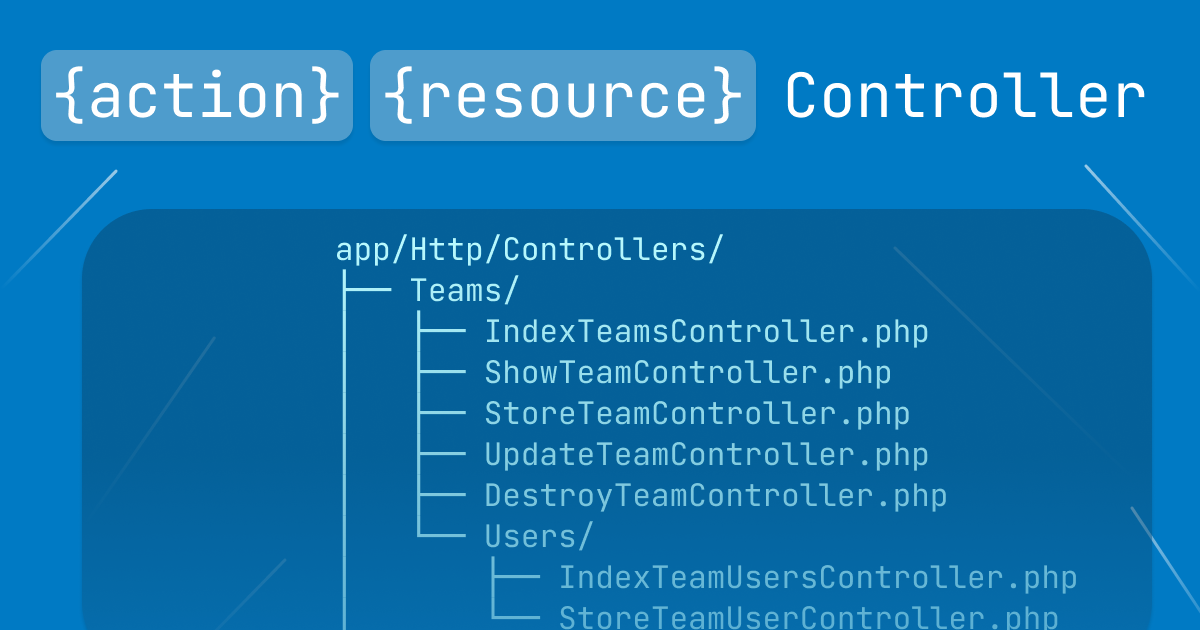
The controller name follows a specific pattern: {Action}{Resource}Controller. In this case, Index describes the action (listing resources) and Teams describes the resource being operated on.
Common action prefixes include:
| Prefix | HTTP Method | Purpose |
|---|---|---|
| Index | GET | List resources |
| Show | GET | Display a single resource |
| Store | POST | Create a new resource |
| Update | PUT/PATCH | Modify an existing resource |
| Destroy | DELETE | Remove a resource |
This naming convention makes it immediately clear what each controller does without opening the file.
Directory Structure
Single action controllers work best with a nested directory structure that mirrors your domain:
app/Http/Controllers/
├── Teams/
│   ├── IndexTeamsController.php
│   ├── ShowTeamController.php
│   ├── StoreTeamController.php
│   ├── UpdateTeamController.php
│   ├── DestroyTeamController.php
│   └── Users/
│       ├── IndexTeamUsersController.php
│       └── StoreTeamUserController.php
├── Projects/
│   ├── IndexProjectsController.php
│   └── ShowProjectController.php
This structure groups related controllers together while keeping each file focused on a single responsibility. Nested directories like Teams/Users/ handle sub-resources cleanly.
The __invoke Method
The __invoke method is a PHP magic method that allows objects to be called as functions. Laravel leverages this to create invokable controllers.
When you define a route like this:
Route::get('/teams', IndexTeamsController::class);
Laravel automatically calls the __invoke method on IndexTeamsController. You don't need to specify @index or any method name.
Type Hints and Return Types
The example controller uses explicit type hints and return types:
public function __invoke(Request $request): \Illuminate\Http\Resources\Json\AnonymousResourceCollection
This declaration tells you exactly what the method accepts and returns. Using fully qualified return types makes the code self-documenting and enables IDE autocompletion. If you want to get even more specific, you could create a new TeamUserCollection class to replace AnonymousResourceCollection but in a lot of cases the extra class isn't worth it for just the type hint.
Using API Resources
The controller returns data through an API Resource:
return TeamResource::collection($request->user()->teams->load('avatar'));
API Resources transform your Eloquent models into JSON responses. They provide a consistent interface for your API responses and separate the presentation logic from your controller.
The load('avatar') call eager loads the avatar relationship to prevent N+1 queries when serializing the teams.
Extending with Query Builder Features
For more complex listing controllers, you can integrate packages like Spatie's Laravel Query Builder:
<?php

namespace App\Http\Controllers\Teams\Users;

use App\Http\Controllers\Controller;
use App\Http\Resources\TeamUserResource;
use App\Models\Team;
use Illuminate\Auth\Access\AuthorizationException;
use Illuminate\Http\Request;
use Spatie\QueryBuilder\QueryBuilder;

class IndexTeamUsersController extends Controller
{
    /**
     * @throws AuthorizationException
     */
    public function __invoke(Request $request, Team $team): \Illuminate\Http\Resources\Json\AnonymousResourceCollection
    {
        $this->authorize('view', $team);

        $teamMembers = QueryBuilder::for($team->users())
            ->with(['avatar'])
            ->allowedSorts(['created_at', 'email', 'name', 'updated_at'])
            ->allowedFilters([
                'email',
                'name',
            ])
            ->cursorPaginate(25)
        ;

        return TeamUserResource::collection($teamMembers);
    }
}
This controller demonstrates additional patterns:
- Route model binding: The
Team $teamparameter is automatically resolved from the route - Authorization: The
$this->authorize('view', $team)call checks if the user has permission before proceeding - Query building: Spatie's QueryBuilder enables filtering and sorting based on query parameters
- Cursor pagination: Using
cursorPaginateinstead of offset pagination for better performance with large datasets
Routing Single Action Controllers
Register single action controllers in your routes file by referencing the class directly:
use App\Http\Controllers\Teams\IndexTeamsController;
use App\Http\Controllers\Teams\ShowTeamController;
use App\Http\Controllers\Teams\StoreTeamController;

Route::middleware('auth:sanctum')->group(function () {
    Route::get('/teams', IndexTeamsController::class);
    Route::get('/teams/{team}', ShowTeamController::class);
    Route::post('/teams', StoreTeamController::class);
});
Each route maps to exactly one controller class, making the routing file a clear index of your API endpoints.
Benefits of Single Action Controllers
This pattern offers several advantages over traditional resource controllers:
Smaller files: Each controller contains only the code it needs, typically under 50 lines.
Easier navigation: Finding the code for a specific action is straightforward. Looking for how teams are created? Open StoreTeamController.php.
Focused testing: Unit tests target a single behavior, making them simpler to write, understand and keep well organized.
Clearer dependencies: Each controller declares only the dependencies it actually uses, making the code easier to reason about.
Better git history: Changes to one action don't affect the git history of unrelated actions.
When to Use This Pattern
Single action controllers work well when:
- Your API has many endpoints with distinct logic
- Controllers tend to grow beyond 100-150 lines
- Multiple developers work on different features simultaneously
- You want to enforce the Single Responsibility Principle
- It's easy to map to a single test file keeping tests well organized
Traditional resource controllers may still be appropriate for straightforward CRUD operations where all methods share significant logic or dependencies.
LLM Prompt for Generating Single Action Controllers
If you use an LLM to help generate Laravel controllers, you can use the following prompt to produce controllers that follow this pattern:
Generate a Laravel single action controller with these requirements:

1. Use an invokable controller with the __invoke method
2. Name the controller following the pattern {Action}{Resource}Controller (e.g., IndexTeamsController, StoreProjectController)
3. Place the controller in a nested namespace matching the resource hierarchy (e.g., App\Http\Controllers\Teams\Users for team user endpoints)
4. Include explicit PHP type hints for all parameters
5. Include a fully qualified return type annotation
6. Return data through a Laravel API Resource (e.g., TeamResource::collection())
7. Include a docblock describing what the controller does
8. Use route model binding for resource parameters
9. Include authorization using $this->authorize() when accessing resources
10. Eager load relationships to prevent N+1 queries
11. For list endpoints, use cursor pagination instead of offset pagination
12. Keep the controller focused on a single responsibility with minimal logic

Example structure:
- Namespace: App\Http\Controllers\{Resource}\{SubResource}
- Class name: {Action}{Resource}Controller
- Return type: Full Illuminate namespace, not imported

Do not include:
- Multiple public methods
- Business logic that belongs in services or actions
- Direct database queries (use Eloquent relationships or repositories)
- Complex conditionals (move to dedicated classes)
This prompt provides specific guidance that produces consistent, maintainable controllers matching the patterns described in this article.
Conclusion
In this article, you learned how to structure Laravel controllers using the single action pattern. You saw how invokable controllers with the __invoke method create focused, maintainable code that follows the Single Responsibility Principle.
The key practices covered include naming controllers with {Action}{Resource}Controller, organizing files in nested directories matching your domain, using explicit type hints and return types, and returning data through API Resources.
From here, you can enhance your controllers by:
- Adding form request validation for input handling
- Implementing service classes for complex business logic
- Creating custom query builder filters for advanced searching